
Most teams setting up prompt tracking for the first time stumble over the same mistakes. They use generic prompts that look more like keywords than real conversations. They skip the most crucial part: testing. And they build everything around existing content. But there are good news: once you know what to look for, these mistakes are easy to fix. This guide walks you through how we do prompt tracking at Radyant, how we build our prompt sets step by step, and how you can do the same.
Key takeaways
- Short-tail prompts without web search rarely surface brand mentions. Context-rich longtail queries are far more effective for prompt tracking generally speaking.
- Always test your prompts in ChatGPT, Perplexity, and Google before setting up tracking. Untested prompts waste time and skew your data.
- The best prompt strategy combines three types: long standard prompts (70–80%), short-tail prompts (10–20%), and brand prompts (10–20%).
- Audience research should be your starting point, not keyword research.
- Prompt tracking is an ongoing process, not a one-time setup.
Disclaimer: At Radyant, we use Peec AI as our AI search monitoring tool and we’re also a Trusted Partner in their directory. That said, there are other tools out there that offer similar functionality. What matters most is the quality of your prompts, not which tool you use to track them.
Want to get a better understanding of your current AI search visibility and how to improve it? Get a free growth audit from Radyant and see your organic growth potential.
Common mistakes that hurt your AI search rankings
Before we get into how to build a great prompt strategy, let’s talk about what most people are doing wrong. If any of these sound familiar to you, you’re not alone.
Using short-tail prompts that never trigger brand mentions
The most common mistake is treating prompts like keywords. A prompt like “e-mail marketing tool” is so generic that LLMs have no idea who’s asking, what the actual problem is, or which solutions would even be relevant. The result: a broad, informational answer that mentions no brands, especially when web search is disabled.
LLMs need more context to give relevant answers. Without it, they default to broad, generic responses that don’t reflect real buying situations, and without web search, brand mentions drop off almost entirely.
What you want are prompts that simulate a real conversation. The kind a potential customer would actually have with an AI tool when they’re trying to solve a specific problem. Think less “e-mail marketing tool” and more: “I’m a Head of Marketing at a 50-person B2B SaaS company looking for an email marketing tool that integrates with HubSpot and helps my team run automated nurture campaigns. What would you recommend?”
That’s the difference between a keyword and a prompt that actually works for brand tracking.
Setting up tracking before testing your prompts
Another common mistake: jumping straight into tracking without testing it first. If a prompt doesn’t generate relevant, helpful answers in ChatGPT, Perplexity, or others, it shouldn’t be in your tracking setup. Full stop!
Tracking bad prompts wastes resources and gives you data that doesn’t reflect real user intent. Test every prompt two to three times across all LLMs you plan to track. Look for whether the AI gives a useful answer, whether relevant sources get cited, and whether web search gets activated in ChatGPT. That last one is a strong signal the prompt is complex enough to trigger real research.
Building around existing content instead of real user pain points
Many teams build their prompt strategy around what they’ve already written: blog posts, landing pages, product pages. The problem is that content often reflects internal language, not the way customers actually talk about their problems.
A customer doesn’t search for “go-to-market orchestration platform”. They ask: “How do I get my sales and marketing teams to stop working in silos?” Build your prompts around real pain points, not content titles.
There’s an upside here too. If you’re writing prompts for questions your audience is asking but you have no content to answer them, that’s a direct signal to create it. Prompt and content strategy should inform each other.
What a good prompt actually looks like
The 180–200 character sweet spot
The most effective prompts for tracking sit between 180 and 200 characters. Long enough to include persona, context, and a specific problem. Short enough to stay focused and natural.
Shorter prompts tend to be too generic. Longer prompts can confuse the AI or lead to irrelevant answers. 180–200 characters hits the sweet spot between specificity and natural conversation.
A simple prompt structure that works
A proven structure for high-performing prompts looks like this:
“I’m a [job title] at a [size & type of company], and I’m looking for a solution for [problem/pain point]. Which [product/service/tool] can you recommend?”
This works because it gives the AI three things it needs to generate a relevant answer: who is asking, what kind of company they’re at, and what specific problem they’re trying to solve. The final question is the call to action. It pushes the AI toward recommendations rather than just information.
A few things to keep in mind:
- Give context: Job titles and company size help the AI assess which sources and solutions are most relevant. A VP of Engineering at a 200-person SaaS company has different needs than a solo founder, and the AI will reflect that.
- Be very specific about the problem: Vague problems lead to vague answers. The more specific the pain point, the more targeted the response.
- Ask for a recommendation: Frame the question as “which tool would you recommend?” not “what is X?” You want the AI to suggest solutions, not explain concepts.
- Write like a real user: Prompts should reflect how a customer would describe their situation to an AI assistant, not how your marketing team would write it. The goal is to simulate the end of a real conversation: context explained, now asking for the best solution.
- Trigger brand mentions: The whole point of prompt tracking is understanding whether your brand shows up when it should. Prompts need to be specific enough that your solution would be a natural recommendation.
Long-tail queries, short-tail prompts, brand prompts: what’s the right mix?
A strong prompt tracking setup uses three types of prompts in a specific ratio.
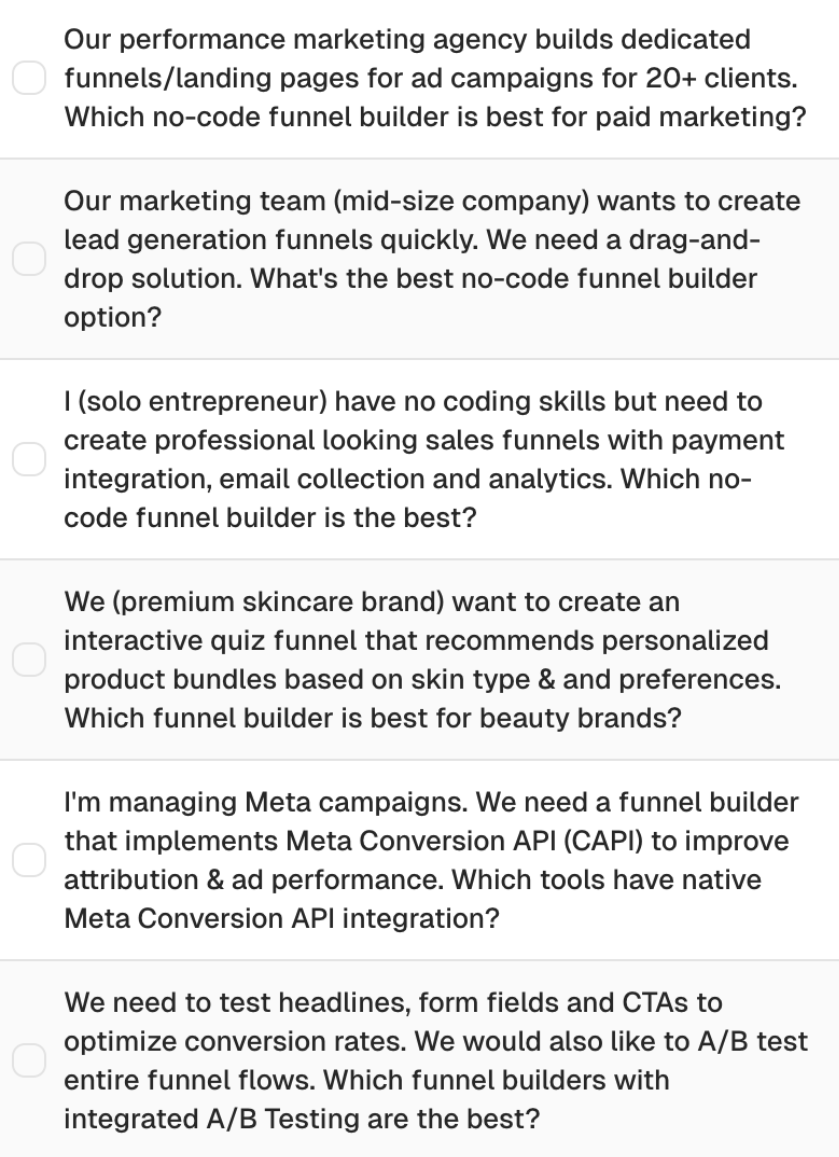
Long standard prompts (70–80%) are your core tracking prompts. Full context: persona, company type, pain point, solution-oriented question. These reflect real user journeys in LLMs and give you the most comparable data across competitors.
A common reaction: “No one types a prompt this long.” True, but we’re not replicating a single message. We’re simulating a full chat journey. In reality, a user sends several short messages in a row before asking for a recommendation, for example “I want to create lead generation funnels quickly”, then “What is a drag-and-drop solution?”, then “What’s the best no-code funnel builder option?” Since you can’t track multi-step conversations, one context-rich prompt covers that arc. LLMs also pull persona context from a user’s chat history, so our prompts account for what the AI would already know by then.
Example: "Our marketing team at a mid-size company wants to create lead generation funnels quickly. We need a drag-and-drop solution. What's the best no-code funnel builder option?"
Examples of long prompts with a lot of context
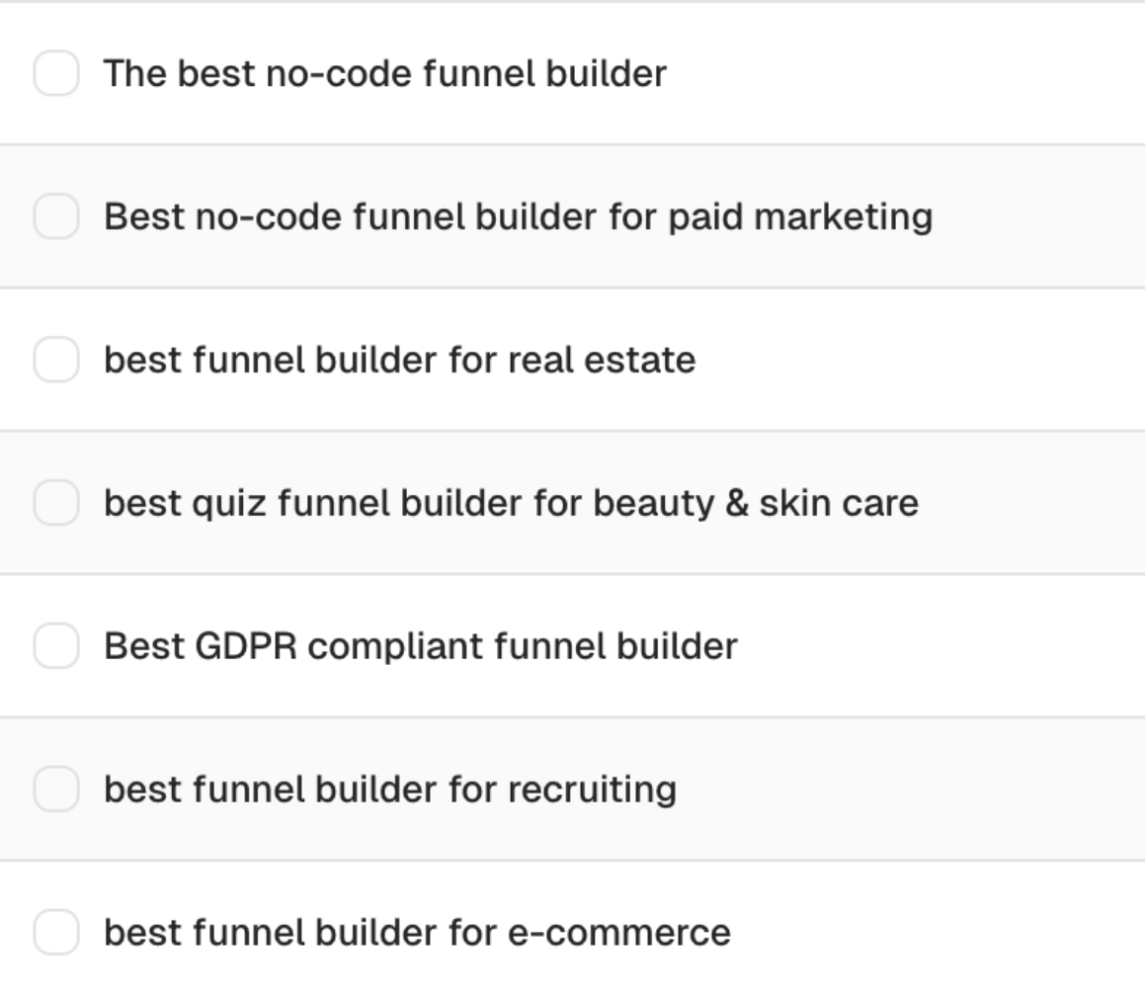
Short-tail prompts (10–20%) strip out the context. They test whether your brand shows up for core topics even without a detailed setup. If you rank well here, LLMs already see you as a relevant player in your category. It’s a strong signal for general brand awareness.
Example: "The best no-code funnel builder"
Examples of short category-driven prompts
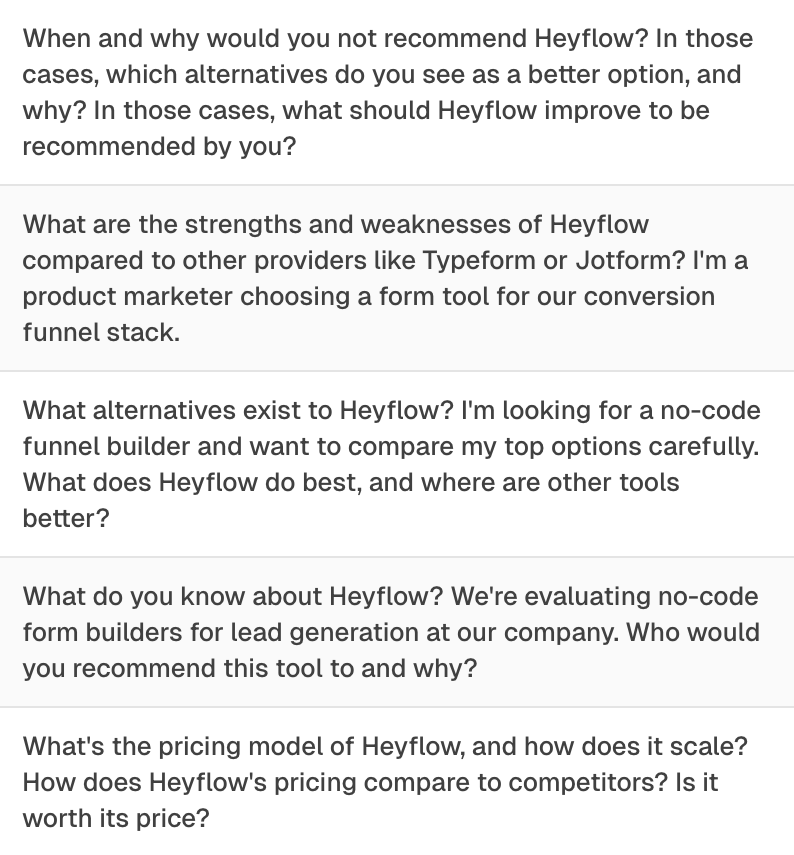
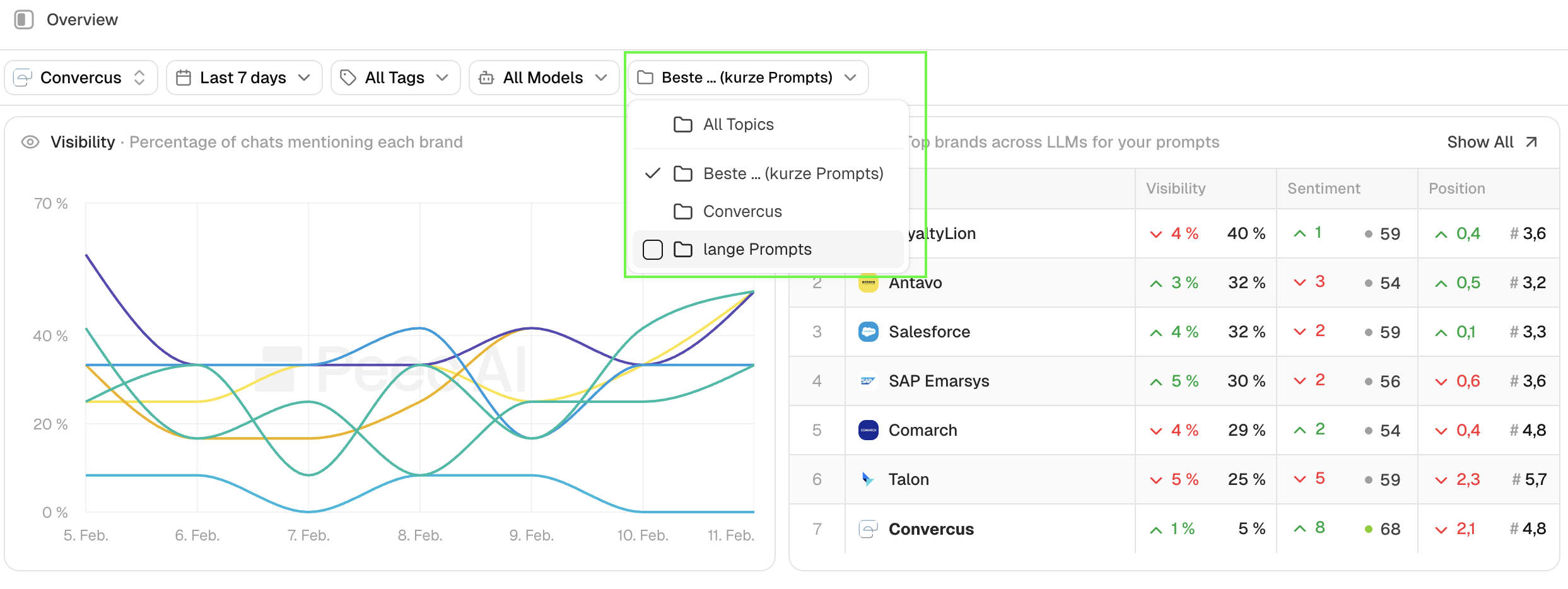
Brand prompts (10–20%) ask the AI directly about your brand. What does it know? Who would it recommend your product to? What alternatives exist? These prompts reveal how LLMs currently perceive your brand and where there’s room to improve. When analyzing overall visibility, filter these out. Your brand will always appear. Learn in Step 8 how to set up topic filters.
Example: "What do you know about [Company]? Who would you recommend it to, and what alternatives exist?"
Examples of branded prompts to track the sentiment
How to build your prompt strategy in 8 steps
Step 1: Start with audience research, not keywords
This is the most important step, and the one most teams skip. You can’t build effective prompts without deeply understanding who your audience is and how they actually talk about their problems.
The best sources for this aren’t keyword tools. They’re your sales team, your onboarding calls, your support tickets. These are the places where customers describe their problems in their own words, before they get cleaned up into marketing language.
Ask your sales team for the three most common objections and questions that come up in demos. Document these pain points in the customer’s own language. Combine insights from sales, support, and onboarding calls to get the full picture.
At Radyant, we do this through short, structured interview sessions with our client’s team (e.g. sales, customer success and product) at the start of every collaboration. 30 minutes with the right person tells you more about your audience than weeks of keyword research. We document everything in the customer’s own words, before it gets translated into marketing language, and use those insights directly when building the prompt set.
Check out how we 10x’ed leads in just 2 years for ToolSense, a B2B SaaS in the asset management and maintenance management space.
For B2B: think about both the company and the individual. What kind of company is your ICP? And which person within that company is actually searching for solutions?
Here’s a useful reframe: your customers rarely search for your category. They search for solutions to specific problems. Someone looking for an SEO agency isn’t typing “SEO agency.” They’re asking: “How do I get more qualified leads from Google without blowing my marketing budget?” That pain point is what you need to translate into prompts.
Step 2: Find longtail queries in Search Console using broad match
Google Search Console is a goldmine for prompt creation, and most teams don’t use it.
Filter for longtail queries using this RegEx filter: ([^""]*\s){6,}
This surfaces queries with six or more words. These longer, more specific queries reflect high-intent searches and translate naturally into context-rich prompts.
Set your date range to at least 6–12 months to capture enough data. And don’t ignore queries with fewer than 10 impressions. Even low-volume queries can reveal important intent signals.
Pay close attention to terminology. Your customers might use different words than your internal team. If users search for “forms” and “form builder” but your content only talks about “funnels”, you’re losing visibility. Build prompts around both variations.
Export the data as a CSV. You’ll use it later when generating prompt ideas with AI.
Step 3: Use keyword research for context, not just volume
Keyword research for prompt tracking works differently than for traditional SEO. You’re not optimizing for individual keywords. You’re using keyword data to understand the full thematic landscape around your product.
Start with broad seed keywords that describe your core business. Use for example broad match in Semrush to surface related terms and phrases across your topic area. The goal isn’t the highest-volume terms. It’s finding the different angles, use cases, and problem framings your audience uses.
Think of keywords as context, not targets. “Sales pipeline management” isn’t a prompt, but it tells you what people are thinking about. That informs how you write prompts. Export the data as a CSV for use in the next step.
Step 4: See how real users ask questions on Reddit Answers
Reddit Answers shows you exactly how real users phrase questions about your topic and which solutions they’re recommending to each other right now.
Search for your seed keywords and collect questions that match your target audience. Pay close attention to how people formulate their problems, these are ready-made templates for prompts. Also note which competitors get mentioned. That tells you who you’re being compared to in real conversations.
But don’t copy Reddit questions directly. Use them as a starting point, then add persona and company context. “What’s the best tool for managing remote engineering teams?” becomes: “I’m an Engineering Manager at a 100-person SaaS company with a fully remote team. What project management tool would you recommend?”
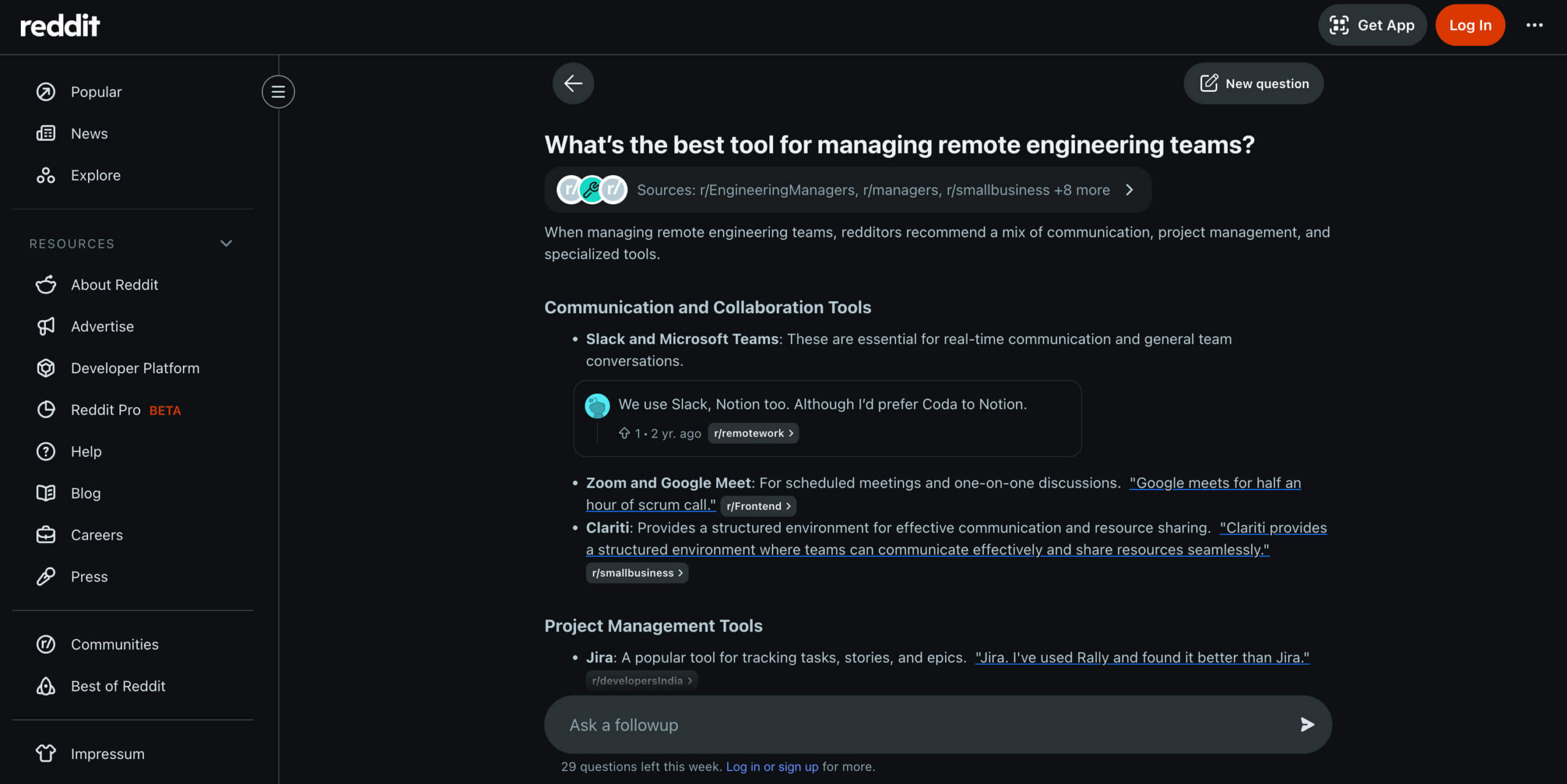
Example of a Reddit Answers response for the question “What’s the best tool for managing remote engineering teams?”
Step 5: Align your prompts with your content plan
Your content plan isn’t just a list of things to write. It’s a roadmap for future AI search visibility.
When you create prompts that connect to planned content pieces, you can later measure the direct impact of your content production on your AI visibility. That’s how you build a proper feedback loop between what you publish and where you show up.
But don’t copy content titles into prompts. “The Ultimate Guide to Revenue Operations” is not a prompt. Translate the intent behind the content into the way a real user would ask about that topic.
And use prompt creation as a content gap analysis. If you’re writing prompts for questions your audience is asking but you have no content to support them, that’s a direct signal to create it.
Step 6: Use AI to generate prompt ideas & then refine them
Once you’ve gathered your audience research, Search Console data, keyword research, Reddit insights, and content plan, you can use an LLM like for example Claude to generate prompt ideas at scale.
Please find a shortcut for your system prompt to set up a project for prompt creation at the bottom of this article.
Set up a Claude project with all your data: a detailed system prompt explaining the task, your content plan, longtail queries from Search Console, pain points from audience research, and your keyword export. The more context you give, the better the output will be.
Ask Claude to generate three variants per prompt. Then do the hard work yourself: review every suggestion, combine the best elements across variants, and adapt the language to match how your customers actually speak. Claude is a tool for generating ideas. Not a replacement for human judgment.
One practical note: always check that your CSV files are being read correctly before you start. Ask your LLM of choice to summarize the contents of each file first. This confirms the data is being interpreted correctly and will actually inform the suggestions.
Step 7: Test every prompt before you track it
Before any prompt goes into your tracking setup, it needs to be tested. Manually. Multiple times. Across all the LLMs you plan to track. No exception.
Run each prompt two to three times in ChatGPT, Perplexity, and Google AI Overview or AI Mode. Look for four things:
- Does the AI give a helpful, relevant answer? If the response is generic or misses the intent of the prompt, rework or discard it.
- Are relevant sources cited? Brand mentions can come from training data alone, but this is far less likely and harder to influence. For your content to be cited and for you to track the impact of new content over time, the AI needs to pull from external sources via web search. Some LLMs do this by default (Google AI Mode, Perplexity), others activate it depending on the prompt or user settings (ChatGPT, Claude, Gemini, Copilot).
- Does ChatGPT activate web search? When ChatGPT triggers a web search, it means the prompt is specific enough to require external information. Your content has a real chance of being cited.
- Does Google generate an AI Overview? This is a strong relevance signal. For more complex prompts, AI Mode may be more useful than AI Overview for tracking, since it enables a deeper conversational response.
If a prompt consistently produces generic, sourceless answers, remove it. It’s not worth tracking.
Step 8: Set up prompt monitoring, topics & tags
Once your prompts are tested and ready, set them up in your tracking tool at least 7–14 days before your first reporting date. This gives you a baseline before you start drawing conclusions.
The most important thing to get right at setup is your topics and tags structure. Without it, you can’t filter your visibility data by theme, audience, or product area. You lose the ability to measure the impact of individual content pieces or campaigns.
Topics are for broad themes: target audience segments (e.g., hospitals and care services), large topic areas (e.g., heat pumps), or a dedicated topic for brand prompts.
Tags are for more specific filters: individual pain points, product features, use cases, or campaign themes.
Visibility for selected topics:
Adding Prompts in Peec AI:
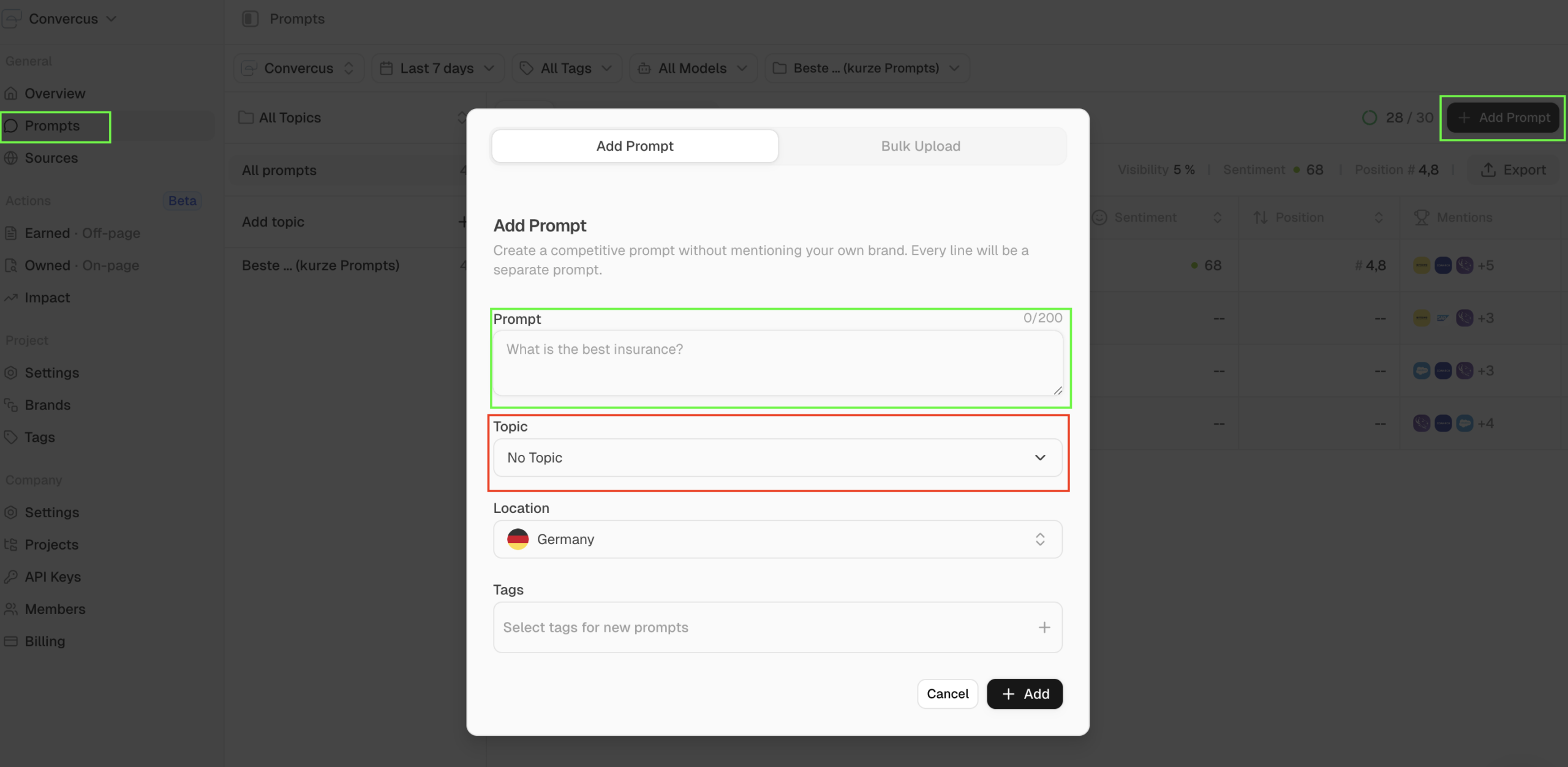
Get your topic and tag structure right from the start. Changing it later means losing comparability in your data.
Why keyword-style prompts fall short in LLM monitoring
Standard SEO tools weren’t built for this. When you use keyword-style prompts in tools like Semrush, short and generic queries like “renovate barn modern,” you almost never get brand mentions or competitor mentions in the LLM responses. These prompts don’t trigger web search, don’t reflect real conversational intent, and don’t push the AI toward making recommendations.
The problem compounds. When a short prompt doesn’t give the user what they need, they follow up with another question. That follow-up, the one where they actually ask for recommendations, is where the visibility action happens. But keyword-style tracking tools don’t capture that second prompt. They only track the first one.
Context-rich prompts simulate the full arc of that conversation in a single query. Persona, problem, solution-seeking question. You’re tracking the moment that matters, not just the opening line. That’s the difference between tracking that gives you real competitive intelligence and tracking that gives you clean-looking data that doesn’t tell you anything useful.
Checklist: are your prompts ready to track?
Before you add a prompt to your tracking setup, run through this list:
- Prompt structure and best practices reviewed
- Audience research completed (ICP, pain points, sales call insights)
- Search Console longtail queries analyzed
- Semrush keyword data integrated
- Content plan considered (mix of existing and planned content)
- Reddit Answers searched for relevant keywords
- Claude project set up with all data (CSV format verified)
- 3 variants per prompt generated and reviewed
- Prompts tested 2–3 times in ChatGPT, Perplexity, and Google
- Prompts set up in tracking tool (ideally 7–14 days before first report)
- Topics and tags assigned for filtering
- Kick-off review completed
- Prompts adjusted or confirmed after review
If you can check every box, your prompt strategy is ready. If not, go back to the step where the gap is. The quality of your tracking data depends entirely on the quality of your prompts going in.
System prompt for prompt creation
Use this as a starting point. Make adjustments if necessary to your specific context.
# System Prompt for Prompt Creation

## Objective
Create a list of **30 context-rich prompts** (180–210 characters) that we will track in Peec AI for **[Company/Brand]**. Additionally, create **5 brand prompts** that directly ask about [Company/Brand].

## Prompt Requirements

### Structure & Context
Each prompt should contain the following elements:
- **Persona/Job Title**: Who is asking the question?
- **Company Context**: Size & type of company (based on ICPs)
- **Problem/Pain Point**: Specific challenge or situation
- **Solution-Oriented Question**: Trigger for brand mentions where possible

**Recommended Structure:**
> "I'm a [job title] at a [size & type of company], and I'm looking for a solution for [problem/situation]. Which [product/service/tool] can you recommend?"

### Specifications
- **Length**: 180–210 characters per prompt
- **Language**: [German/English – depending on target market]
- **Number of Suggestions**: 3 variants per prompt
- **Brand Mention Trigger**: Question should provoke possible providers/solutions

## Data Sources & Integration

### 1. Company Context
- **Basic Information**: [Insert link to company website]
- **Onboarding Document**: Read the provided document carefully – it contains important information about:
  - ICPs (Ideal Customer Profiles)
  - Target audience pain points
  - Product details & unique selling propositions
  - Industry context

### 2. Content Plan
- **Integration**: Use the topics defined in the content plan as a basis
- **Paraphrasing**: Do NOT copy topic names 1:1, but formulate them realistically like a user who:
  - Is researching information about this topic
  - Is looking for a solution to a related problem
  - Has a specific challenge in this area
- **Goal**: Content pieces should appear as relevant sources or trigger brand mentions

### 3. Search Console Data (CSV)
- **Longtail Queries**: Identify actually used search queries with clicks & impressions
- **Terminology Analysis**:
  - Which terms do potential customers actually use?
  - Are there differences from "official" technical terminology?
  - **In case of deviations**: Create separate prompt variants with both term variations and briefly comment on the differences

### 4. Keyword Research Data (CSV)
- **Source**: Semrush Broad Match keyword data export
- **Purpose**: Understand thematic relevance and different facets of topics for broad coverage
- **Usage**:
  - Identify related terms and phrases beyond the core business keywords
  - Look for thematic relevance rather than just search volume
  - Use keyword context to inform prompt formulation
  - Combine keyword insights with pain points and user intent
- **Integration**: Transform keywords and their context into natural, conversational prompts

### 5. Reddit Answers Insights
- **User Questions**: [Provide relevant questions from Reddit Answers related to seed keywords]
- **Common Themes**: [Note recurring topics and pain points from questions]
- **Competitor Mentions**: [Which solutions/tools are being recommended in answers]

**Usage**: Use the question formulations from Reddit Answers as templates for prompts, enhanced with persona and company context.

## Output Format

### Standard Prompts (30 pieces)
For each prompt, create **3 suggestions** in the following format:
```
**Theme/Topic**: [Thematic reference]

**Variant 1** (XXX characters):
[Prompt text]

**Variant 2** (XXX characters):
[Prompt text]

**Variant 3** (XXX characters):
[Prompt text]

**Notes**: [Optional: terminology differences, special considerations]

---
```

### Brand Prompts (5 pieces)
Additionally create **5 prompts** that directly ask about [Company/Brand], each with **3 suggestions**:

**Example Structure:**
- "What do you know about [Company/Brand]? Who would you recommend the product/solution to and why?"
- "For which use cases is [Company/Brand] particularly suitable? What alternatives exist?"
- "What are the strengths and weaknesses of [Company/Brand] compared to other providers?"

## Important Notes

### Realistic Formulation
- Prompts should reflect natural conversations in LLMs
- Consider user journey: The final prompt can combine multiple chat messages
- Use authentic language, no generic marketing phrases

### Pain Point Orientation
- Use the pain points from the onboarding document
- Formulate problems as customers would actually describe them
- Focus on conversion-relevant situations

### Avoid
- ❌ Too generic formulations without context
- ❌ Keyword stuffing or unnatural language
- ❌ 1:1 adoption of content plan titles
- ❌ Ignoring actual user terminology from Search Console

### Testing Preparation
The created prompts will later be tested in the following LLMs:
- ChatGPT (with Web Search)
- Perplexity
- Google AI Overview / AI Mode

Formulate the prompts so they trigger relevant, helpful answers there.

---

**Now start with prompt creation based on the provided data sources.**